Building a Custom Email Forwarder with AWS SES — No Email Hosting Required
How I built a serverless email forwarding pipeline using AWS SES, S3, and Lambda — so emails sent to hello@mineth.dev land in my personal Gmail without any third-party email hosting.
Building a Custom Email Forwarder with AWS SES — No Email Hosting Required
When I launched mineth.dev, one of the first things I wanted was a professional email address — hello@mineth.dev. Simple enough. But I didn't want to pay for a hosted email service like Google Workspace just to receive the occasional message from my portfolio site.
So I built my own email forwarding pipeline using AWS. Emails sent to hello@mineth.dev land directly in my personal Gmail — no third-party email hosting, no monthly subscription.
Here's how the architecture works.
The Problem
Owning a domain doesn't automatically mean you can receive emails on it. You need something sitting behind that domain that knows how to accept, process, and deliver mail. Typically that's an email hosting provider. But if all you need is to receive emails and forward them somewhere — that's a problem you can solve with a bit of cloud infrastructure.
The Architecture
The pipeline involves four AWS services working in sequence, with Cloudflare handling DNS routing on the front end.
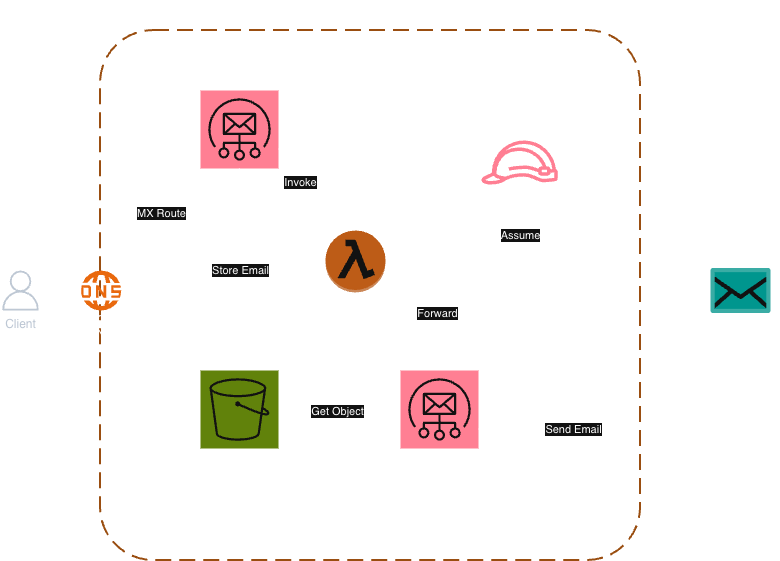
Cloudflare DNS — The Entry Point
Every email sent to hello@mineth.dev starts at DNS. An MX (Mail Exchanger) record on my domain tells the sending mail server where to deliver the email. I configured this MX record in Cloudflare to point to AWS SES's inbound SMTP endpoint in us-east-1.
Think of it like a postal address redirect — the MX record says "mail for this domain goes here."
AWS SES (Inbound) — Receiving the Email
AWS Simple Email Service (SES) is typically known for sending emails, but it also has an email receiving feature. Once the email arrives at the SES inbound endpoint, a receipt rule takes over.
The receipt rule is configured to match emails addressed to hello@mineth.dev and trigger two actions in sequence:
- Store the raw email in S3
- Invoke a Lambda function
AWS S3 — Raw Email Storage
Before any processing happens, the full raw email is stored in an S3 bucket (mineth-ses-emails). This acts as a buffer — Lambda reads the email from here rather than receiving it directly. It also means you have a copy of every inbound email if you ever need to replay or debug.
AWS Lambda — The Forwarder
This is where the logic lives. The Lambda function is triggered by SES, fetches the raw email from S3, and then does three things:
- Rewrites the From header — so the forwarded email shows the original sender's address rather than an AWS address
- Sets a Reply-To header — so when I hit reply in Gmail, it goes back to the original sender, not into a void
- Forwards the email via SES outbound to my personal Gmail
AWS SES (Outbound) — Sending the Forwarded Email
The Lambda sends the rewritten email using SES's SendRawEmail API. For this to work, both the sending identity (hello@mineth.dev) and the destination address need to be verified in SES — a requirement when operating in AWS's sandbox environment.
IAM — Keeping It Locked Down
The Lambda function runs with an IAM role that has only two permissions:
s3:GetObject— to read the email from the bucketses:SendRawEmail— to forward it
Nothing more. Least privilege by design.
The Full Flow
Sender → Cloudflare DNS (MX record)
       → AWS SES Inbound (receipt rule)
       → S3 (store raw email) + Lambda (invoke)
       → Lambda reads from S3
       → Lambda rewrites headers
       → AWS SES Outbound (SendRawEmail)
       → Personal Gmail
Infrastructure as Code
The entire setup — S3 bucket, IAM role, Lambda function, SES receipt rules, and Cloudflare DNS records — is managed with Terraform, with state stored remotely in HCP Terraform Cloud. Any infrastructure change goes through a pull request, gets planned automatically, and is applied on merge.
Why This Approach?
A few reasons this worked well for my use case:
- Cost — AWS SES pricing is extremely low for the volume I'm dealing with. Essentially free.
- Control — I own the pipeline end to end. No vendor lock-in on the email hosting side.
- Learning — It was a good excuse to get hands-on with SES receiving, which isn't something most people reach for day to day.
It's not the right solution for everyone — if you need to send emails from your custom domain or manage a team inbox, a proper email hosting provider is the better call. But for a personal portfolio where you just need to receive contact emails, this does the job cleanly.
If you have questions or want to chat about the setup, you can reach me at — you guessed it — hello@mineth.dev.